Operating approval
Once your business is verified, our team reviews the account before payments open. What pending and withheld mean, and what you can still do while you wait.
Last updated 20 October 2026
The step after the three
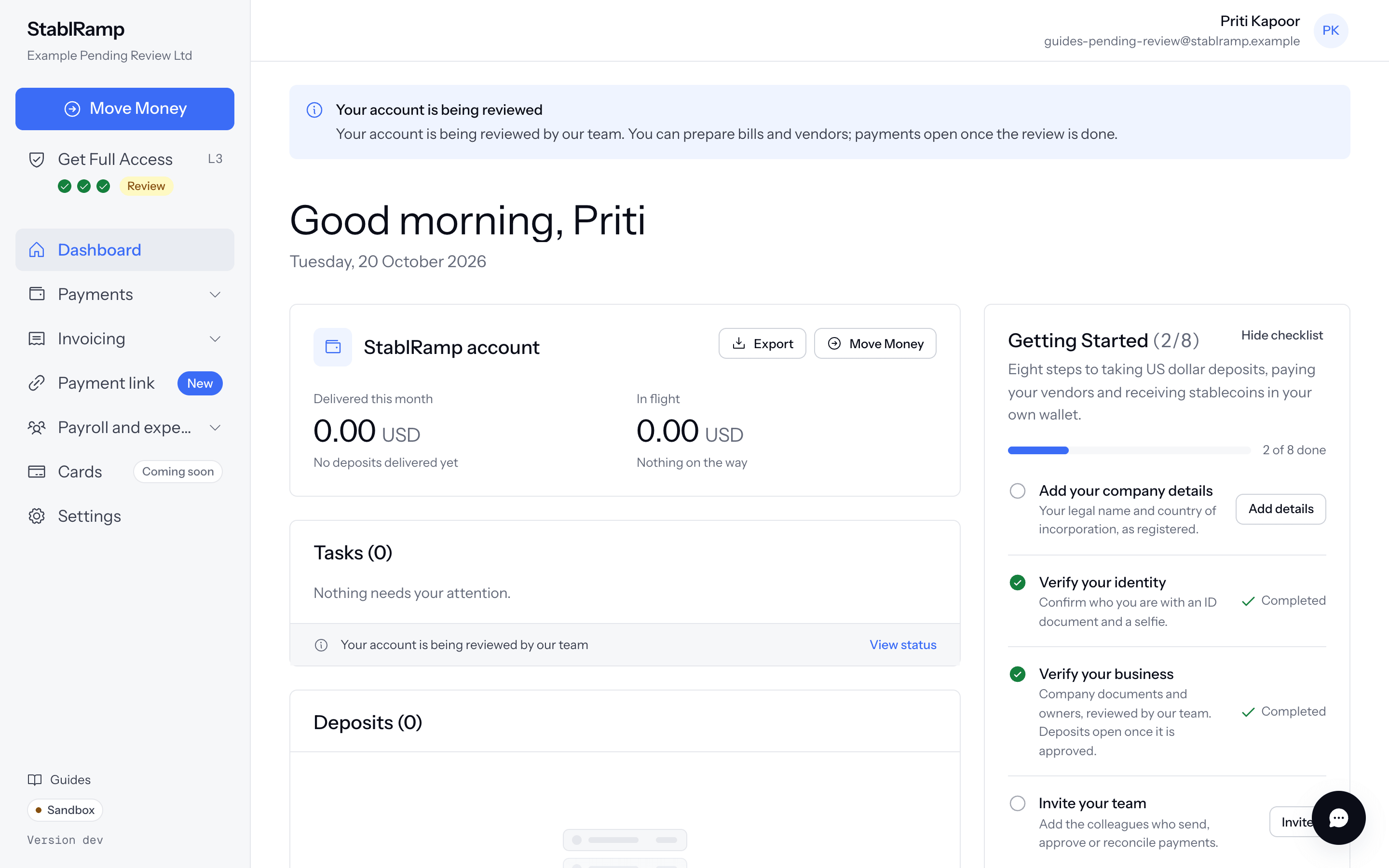
Get Full Access ends once your business is verified, at L3. Before payments open, our team reviews the account to decide whether it may operate. Nothing more is asked of you for this step: our team opens the review by itself once the three are done, and the sidebar's Get Full Access row gains a fourth marker next to its three dots, a Review pill while it is open.
This is the same rule everywhere on StablRamp: every feature stays open for records and drafts, and only the moment that would send, pay or pay someone out waits on verification and this approval. Reaching one of those moments before every step is done never fails silently; the refusal names exactly which steps are still missing, identity, business verification, or this approval, each a link to the page that finishes it.
While it is open, the dashboard carries the task Your account is being reviewed by our team, and every signed-in page shows a banner with the same news under the header. There is no form to fill in for this step: our team contacts you through Help if anything more is needed.
While it is pending
The banner reads Your account is being reviewed by our team. You can prepare bills and vendors; payments open once the review is done. You can add vendors, import bills, build approval policies and save payments as drafts; what waits is anything that actually moves money or reaches someone outside StablRamp: paying or submitting a bill or a payment, sending an invoice, publishing a payment link, and the bank details on Add Funds, which shows this same notice in their place.
A deposit account you already hold is not affected: it keeps receiving money exactly as before, and existing deposits are unaffected. Only Add Funds, and the gated actions above, wait for the review.
If it is withheld
Our team can also withhold approval. The banner then reads Payments are on hold, with the reason our team gave, or, if none was given, Our team has not approved your account to operate yet. Contact us through Help to find out what is needed. Go to Help opens Getting help to ask.
Withheld is not final. Our team can move the account back to review, or approve it, once whatever they raised is addressed.
Once it is approved
Approval removes the banner and the dashboard task. The sidebar's fourth marker turns into a check mark reading Approved, and every gated action opens: paying and submitting bills and payments, sending invoices, publishing payment links, and the bank details on Add Funds. You are emailed once this happens, so there is nothing to check back for.