Batch payments from a spreadsheet
Pay many vendors from one CSV file: preview every row before anything is saved, approve the batch once, then pay each row from your own wallet.
Last updated 20 October 2026
Pay many vendors from one CSV
Batch payment, on Direct Payments, pays many vendors from one upload rather than one payment at a time. StablRamp still moves no money: the batch is approved as one decision, then every row is paid from your own wallet and checked on chain, exactly as a single payment is. Bills offers the same idea for a batch of vendor invoices, under Batch of bills.
The template and the preview
- Choose Batch payment, then Download template for the exact columns:
vendor_email, amount, asset, network, address, reason. - Fill one row per payment: the vendor's email address, the amount in US dollars, the coin (USDC or USDT), the network of its wallet, the wallet address, and an optional reason shown to the vendor.
- Drop the file, or choose one, up to 1,000 rows and 1 MB.
Nothing is saved yet. The preview lists every row with its vendor, the payment method it resolves to, and the amount; a wallet address not yet saved for that vendor is marked (new, saved for the vendor) and only saved once the batch is created. A wallet already saved for a different vendor is an error, flagged by line.
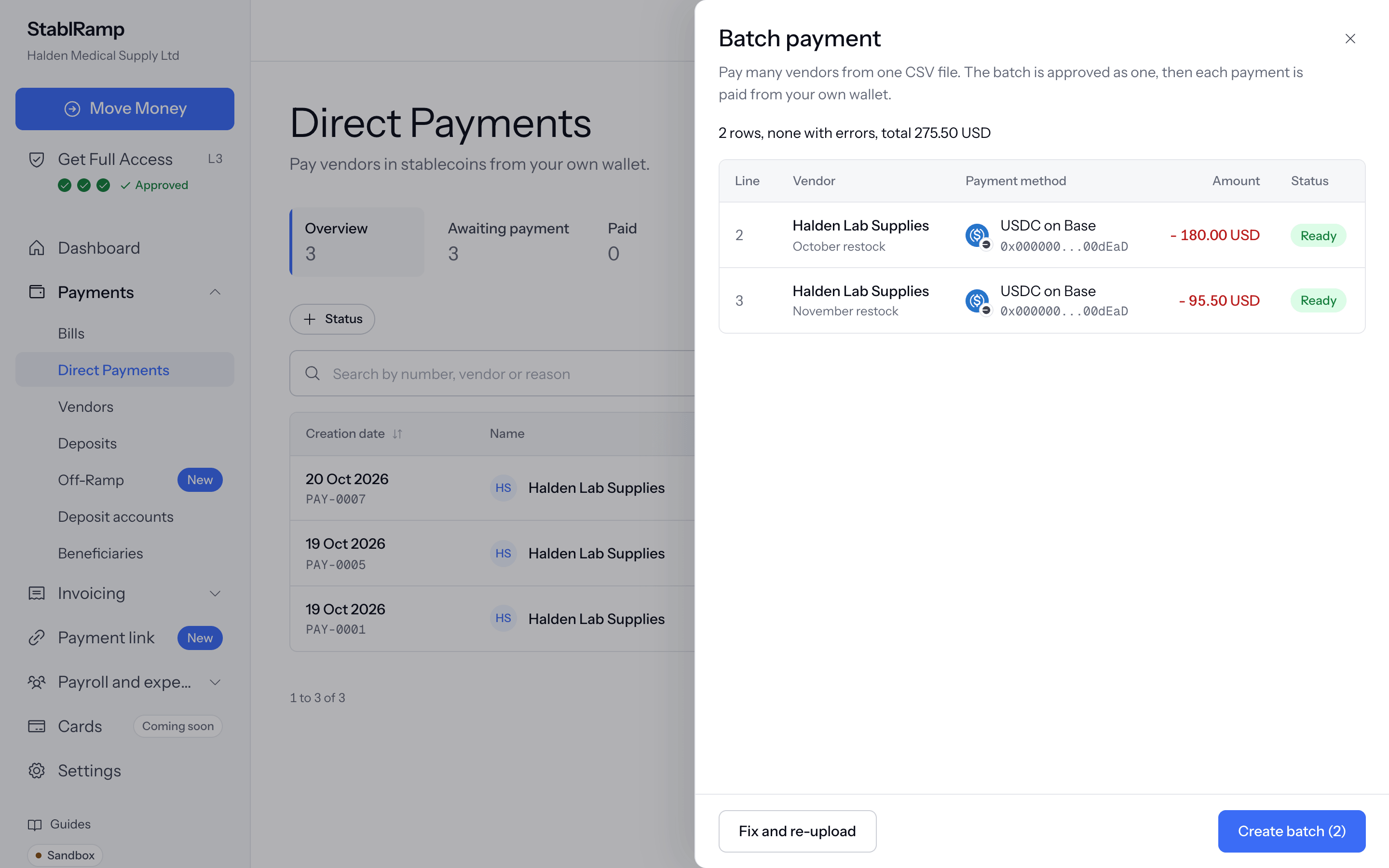
A row with a problem is marked Error rather than Ready, and the summary counts how many of each. Fix and re-upload replaces the file without losing your place.
Create the batch
Choose Create batch to save every ready row at once, numbered as one batch, for example PB-0003. Without an approval policy over the total, the batch is ready to pay straight away; with one, it waits for approval. Open the batch takes you to its page to pay each row.
One approval covers the batch
A batch is approved or rejected once, for every row together: rows are never submitted, approved or rejected one by one. Approve moves every waiting row on to be paid. Reject, with a reason, returns every row to draft; correct them, then submit the batch again, which applies the policy to the total that is still live.
Pay each row
- Open the batch and choose Pay on a row.
- Pay from your own wallet and submit the transaction hash exactly as in Pay a vendor with Send Funds; each row is verified on chain on its own.
- Progress counts how many of the batch are paid, for example 1 of 2 paid, and the batch itself reads Paid once every row is, or Paid rows alongside others still owing read as partially paid.
Cancel batch cancels every row not yet paid; it is refused while a row's transaction hash is still being checked. A row paid outside StablRamp, by bank transfer, is marked paid the same way a single bill or payment is.